What is Microsoft Sentinel?
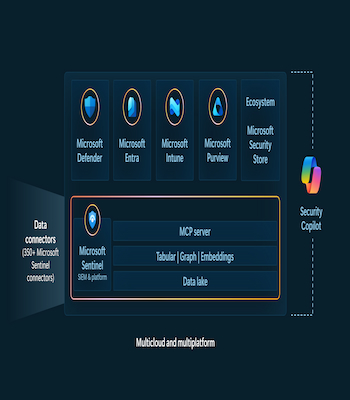
Microsoft Sentinel is a cloud-native security solution that acts as both a SIEM and a SOAR platform. It ingests data at a massive scale from across your entire digital estate, using over 350 built-in connectors for Microsoft services and other clouds like AWS and GCP. Sentinel then applies AI-powered analytics to detect threats, automatically grouping related alerts into incidents for your team to investigate. Its automation rules and playbooks handle repetitive response tasks, from assigning incidents to running complex remediation workflows, freeing your analysts to focus on real threats. With proactive hunting tools and deep investigation capabilities, Sentinel transforms raw telemetry into actionable insights, keeping your security operations one step ahead.
Microsoft Sentinel, Product Details
Microsoft Sentinel gives you a bird’s-eye view across your entire enterprise. It reinvents SIEM for a modern, cloud-first world. You see threats clearly and stop them before they cause harm. Sentinel puts decades of Microsoft security intelligence to work at a massive scale. You eliminate the headache of infrastructure setup and maintenance. The platform scales elastically to meet your security needs while reducing IT costs. You collect data across every user, device, application, and infrastructure—whether on-premises or in multiple clouds.
AI supercharges your threat detection and response, making both smarter and faster. You uncover previously hidden threats and slash false positives using advanced analytics and Microsoft’s unparalleled threat intelligence. You investigate threats with AI-powered tools and hunt suspicious activities at scale, tapping into decades of cybersecurity expertise. And when incidents strike, you respond rapidly with built-in orchestration and automation that handles common tasks for you. Microsoft Sentinel transforms security operations from reactive chaos into proactive control.
How Does Microsoft Sentinel Work?
Imagine you have a giant castle with many rooms, doors, and windows. You have guards watching everywhere, but there are so many places to watch that some bad guys might sneak in without anyone noticing. Microsoft Sentinel is like a magic security tower in the middle of your castle. It has special eyes that can see everything happening in every single room at the exact same time. If a door creaks open, it sees it. If a window shakes, it notices. It watches all the people, computers, and toys in the whole castle, no matter where they are.
When something weird happens, like someone trying to open a door with the wrong key, the magic tower sends a signal to the guards. It even groups all the weird things together, so the guards know if a big problem is coming. It doesn’t just sit there, either. Sentinel can act like a robot helper and lock doors or turn on alarms by itself, so the guards don’t have to do everything by hand. It helps the good guys find the bad guys faster and keeps the castle safe, all while saving the guards time and energy.
Microsoft Sentinel Pros and Cons
Users rave about Microsoft Sentinel’s real-time monitoring, which helps them spot and stop threats instantly. They love the automated alert response, giving them peace of mind through centralized security oversight. The dashboard stands out for its seamless usability, making security management intuitive and comprehensive. Users appreciate the fast and secure threat response, which strengthens overall security and risk management. And they benefit from seamless data management, enhancing workflows and delivering thorough security analytics.
READ ALSO: How to Get More TikTok Views by Posting Longer Videos (60+ Seconds)
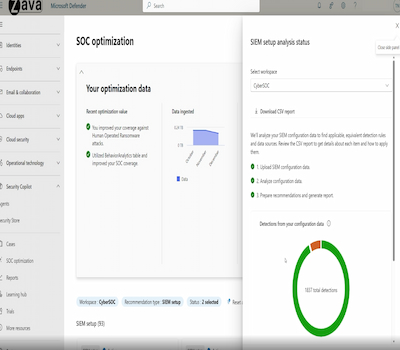
But users also voice real concerns. Cloud dependency frustrates many, especially those with low-speed internet and reliance on commercial providers. The complex configuration challenges even seasoned professionals, demanding advanced technical skills for effective setup. Users encounter configuration issues that eat up time and require deep expertise. The difficult setup process feels overwhelming without dedicated security experts and proper training. And the poor interface design frustrates users, making navigation and feature understanding unnecessarily difficult. Microsoft Sentinel delivers powerful protection, but it demands serious commitment to master.
Microsoft Sentinel, User Reviews
Users rave about Microsoft Sentinel’s seamless integration with other Microsoft services. This integration supercharges security monitoring and speeds up incident response. The platform’s cloud-native architecture makes scaling effortless. Organizations love how easily they can manage vast amounts of data. But there’s a catch. Costs can spiral upward as data usage climbs. Smaller businesses often find this pricing model a tough pill to swallow. Microsoft Sentinel delivers powerhouse protection, but organizations must watch their budgets closely. The platform shines bright for those who can afford its full potential.
READ ALSO: Grammarly Review: The Good, the Bad, and the Ugly of A Grammar Checker
Grammarly is like a magic robot that lives on your computer or phone. It helps you write better. When you type words, Grammarly looks at them. It checks if your spelling is right. Grammarly checks if your sentences make sense. It even suggests better words to use. Think of it as a helpful friend who reads everything you write and tells you how to make it better. It works almost everywhere—in emails, documents, and even on social media. Grammarly makes sure your writing is clear and easy to understand. It’s like having a teacher sitting next to you, ready to help whenever you need it.
Centralized Visibility with Smooth Integration
Anas M., a SOC Analyst at a small-business IT firm, gives Microsoft Sentinel a solid 4 out of 5. He loves the centralized visibility the platform provides. He sees logs, alerts, and incidents all in one place without jumping between tools. This speeds up his investigations dramatically. He also appreciates the built-in analytics and detection rules. They come ready to use and fully customizable, so he never starts from scratch. The seamless integration with the Microsoft ecosystem, Azure, Microsoft 365, and Defender tools makes onboarding almost effortless.
But Anas points out real areas for improvement. Cost visibility remains confusing, especially around data ingestion. He warns that it’s easy to overshoot your budget if you are not constantly monitoring usage. The learning curve also slows him down. He struggles to get comfortable writing queries, and while the out-of-the-box rules help, he still needs to fine-tune them to reduce noise. Microsoft Sentinel delivers powerful protection, but it demands careful attention and patience to master.
Centralized, Cloud-Native Security Monitoring with Powerful Automation
A verified user in Computer & Network Security from a large enterprise gives Microsoft Sentinel a stellar 4.5 out of 5. They love its centralized, cloud-native security monitoring across multiple data sources. The platform simplifies collecting, analyzing, and correlating massive security logs without the headache of managing traditional SIEM infrastructure. Built-in analytics rules, threat intelligence integration, and playbook-based automation help them detect and respond to threats with impressive efficiency. The seamless integration with other Microsoft security services creates a unified incident view, helping teams investigate and respond faster.
But challenges remain. The initial setup and configuration demand significant time, especially for teams new to SIEM platforms or Azure services. Analytics rules and data connectors require careful tuning to cut down on false positives and keep alerts relevant. And the data-ingestion-based pricing model can become expensive if they collect large log volumes without proper filtering. They recommend that organizations plan their log sources and retention strategy thoughtfully. With careful planning, they can keep costs under control while still capturing the critical logs they need. Sentinel offers immense power, but it rewards those who invest the time to master its nuances.
Microsoft Sentinel Cost and Pricing
Microsoft Sentinel offers 11 pricing editions to fit different usage levels and team sizes. The free trial lets you explore the platform at zero cost. For daily data ingestion, plans scale from $123 for 100 GB per day up to $4,305 for 5,000 GB per day. Pay-as-you-go provides flexible billing for fluctuating needs, and a pricing calculator helps you estimate costs before committing. Higher-tier plans are available through direct consultation with the vendor. Users rate the platform 4.4 out of 5. But remember, final costs depend on negotiations with the seller. Microsoft Sentinel delivers powerful protection, but pricing complexity demands careful planning to avoid unexpected expenses.
Microsoft Sentinel Alternatives, Pricing/Cost
Rapid7 InsightIDR starts at $2,156 per month with a 500-asset minimum. This price includes user behavior analytics, endpoint detection, deception technology, centralized log search, and automated containment.
Datadog offers a free tier with core collection and visualization features. You get 1-day metric retention, support for up to 5 hosts, out-of-the-box dashboards, and 400+ integrations—all at zero cost. KnowBe4 PhishER costs $1.50 per seat per month for 101-500 seats on a 3-year plan. This platform helps you manage and respond to phishing threats efficiently.
Each alternative brings unique strengths at different price points. Organizations must weigh their security needs against their budgets. The best fit depends on your team size, required features, and long-term strategy. Microsoft Sentinel holds its own against these competitors, but exploring alternatives ensures you make the right choice for your organization.
About the Author