
RiiTek Keyboard Buying Guide
Finding the right wireless RiiTek keyboard transforms how you interact with your home theater PC, Raspberry Pi, or media setup. RiiTek specializes in compact keyboard and touchpad combinations that replace bulky desktop peripherals. This guide breaks down the top RiiTek wireless keyboards so you can pick the best option for your needs.
RiiTek X1: The Compact Remote Alternative
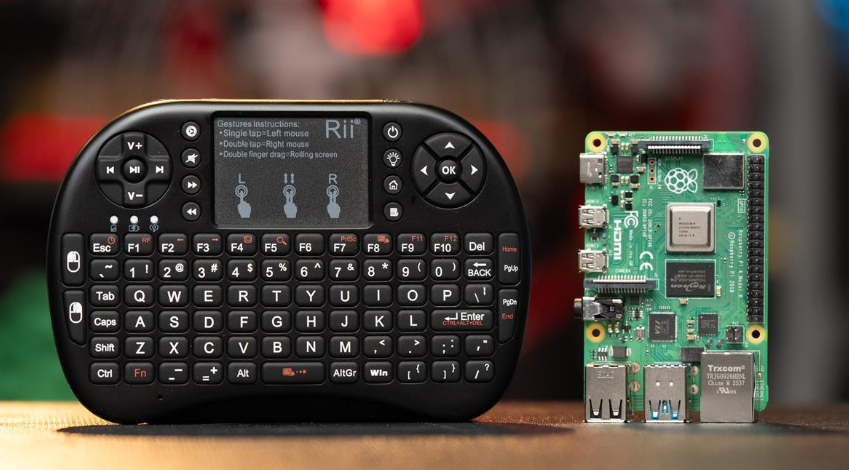
The RiiTek X1 shrinks a full QWERTY layout and touchpad down to the size of a standard TV remote control. It fits comfortably in one hand for basic media navigation or two hands for typing.
Key Features of the RiiTek X1
-
90-Degree Convertible Touchpad: You can rotate the touchpad orientation to use the device horizontally for typing or vertically like a remote.
-
Dedicated Media Controls: Physical directional keys and mouse buttons sit directly below the touchpad for quick navigation.
-
2.4GHz Wireless Connection: A small USB dongle plugs into your PC, PlayStation, or Xbox.
-
Integrated Storage: The USB receiver slides into a dedicated slot on the top edge so you never lose it.
RiiTek Rii i8: The Best Companion for Raspberry Pi
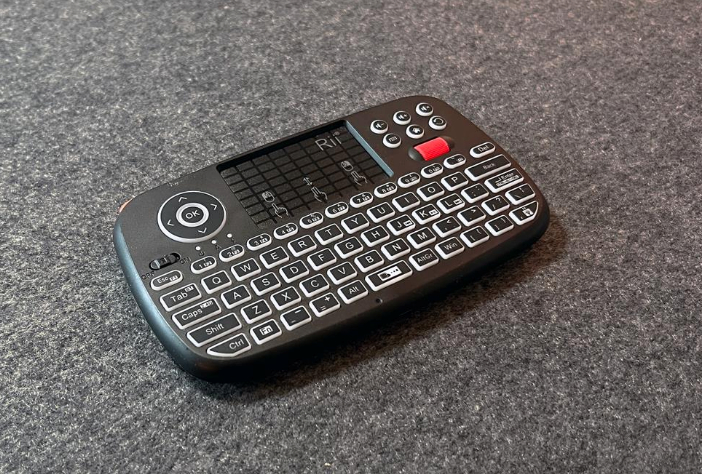
The RiiTek Rii i8 serves as an essential tool for single-board computers like the Raspberry Pi. When you build embedded projects or home servers, you often need quick input without cluttering your workspace with full-sized peripherals.
Key Features of the Rii i8
-
Ergonomic Handheld Shape: Curved grips make two-handed typing effortless.
-
Center-Mounted Touchpad: Multi-touch navigation sits conveniently above the key layout.
-
Plug-and-Play Compatibility: Works instantly with Linux distributions, Raspberry Pi OS, and smart TVs.
RiiTek i4: The Versatile Thumb Typist’s Tool
The RiiTek i4 Mini Wireless Bluetooth Keyboard delivers an excellent balance between typing comfort and media controls. Designed for handheld thumb typing, it seamlessly controls media apps like Steam, Netflix, and the Xbox App on TV-connected computers.
Key Features of the RiiTek i4
-
Dual-Mode Wireless Connectivity: Connect via the included 2.4GHz USB receiver or Bluetooth 4.0.
-
Gamepad-Style Shoulder Buttons: Left and right bumper buttons on the shoulders act as mouse clicks, making dragging and clicking accurate.
-
Backlit Keys: Built-in backlighting helps you type in dark media rooms.
-
Navigation Controls: Features a physical scroll wheel, directional pad, and quick volume buttons.
READ ALSO: How I Built a 12V, 2000-Watt Solar Setup From Scratch
I love solar setup projects. This one hooked me instantly. I decided to build a 12-volt system with a 2,000-watt inverter and a 12-volt fuse block. It’s a popular setup. Plenty of people use it. I wanted to understand it inside and out before I touched a single wire. I split my process into two parts. First, I sat down and studied the theory. Then I built the thing. I think that order matters. You need to understand why before you start connecting parts.
RiiTek K16: The Premium Multimedia Powerhouse
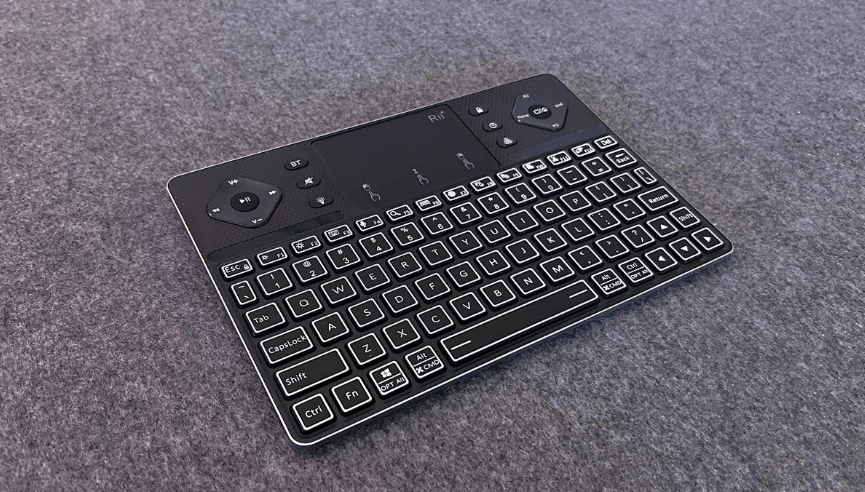
The RiiTek K16 offers a larger layout roughly the size of a compact tablet. An aluminum alloy housing gives this model a sleek, durable feel suited for home theater setups or mobile productivity.
Key Features of the RiiTek K16
-
Scissor-Switch Keys: Low-profile keys deliver crisp tactile feedback similar to modern laptop keyboards.
-
Multi-Device Bluetooth Pairing: You can pair up to three Bluetooth devices simultaneously and switch between them.
-
Expanded Touchpad & Media Buttons: A larger touchpad includes labeled media controls for instant playback adjustments.
-
Wide Compatibility: Works across Windows, macOS, Android, and media platforms like Apple TV.
Summary: Which RiiTek Keyboard Should You Buy?
| Model | Best For | Standout Feature | Connectivity |
| RiiTek X1 | Pocket portability & basic remote use | 90-degree rotating touchpad | 2.4GHz USB Dongle |
| RiiTek Rii i8 | Raspberry Pi & DIY maker projects | Compact design for embedded builds | 2.4GHz USB Dongle |
| RiiTek i4 | Living room PCs & HTPC navigation | Shoulder mouse buttons & scroll wheel | Bluetooth 4.0 & 2.4GHz Wireless |
| RiiTek K16 | Couch typing & multi-device control | Aluminum chassis & scissor switches | Multi-Device Bluetooth |
-
Select the RiiTek X1 or Rii i8 if you need the smallest possible footprint for quick system setups or Raspberry Pi projects.
-
Choose the RiiTek i4 for the best overall home theater PC experience.
-
Pick the RiiTek K16 if you need comfortable desktop-style typing on a portable, premium device.