GAMES TECHNOLOGY

PUBG Gaming Phones and System Requirements

PUBG Gaming Phones

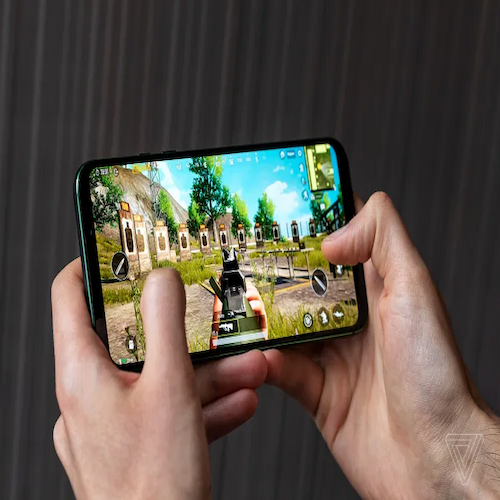
You drop from the plane, spot an enemy, and line up the perfect headshot, but then your phone stutters, the screen freezes, and suddenly you’re back in the lobby staring at a “You Died” screen. Few things in mobile gaming feel more frustrating than losing a chicken dinner because your device couldn’t keep up. PUBG Mobile demands split-second reactions, consistent frame rates, and a display that responds before your brain even finishes processing the threat. Whether you’re spraying down enemies in close-quarters combat or tracking a sniper from 300 meters away, your phone can mean the difference between a glorious victory and a humiliating defeat. So, if you’re ready to stop blaming your lag and start blaming your opponents, here are the phones that will actually give you a fighting chance.

What Is PUBG all about?

PUBG Mobile drops 100 players onto a massive, 8×8-kilometer island where only the last person or team standing wins. You parachute from a plane, scavenge weapons, ammunition, armor, and healing items from buildings and supply crates, and fight to survive against everyone else. An ever-shrinking “Blue Zone” forces players closer together, so hiding indefinitely doesn’t work. You must keep moving or take damage from the encroaching wall of electricity. You choose your mode: solo (no allies, pure survival), duo (teams of two), or squad (teams of four). Communication and teamwork often decide the winner.

Realism and strategy set PUBG apart from other shooters. Bullets travel with real physics, meaning you must account for drop over distance and lead moving targets. Different weapons behave uniquely; the AKM kicks hard but hits hard, while the M416 offers stability at the cost of needing more attachments. Vehicles like buggies, jeeps, and motorcycles let you traverse the map quickly but make noise that alerts nearby enemies. Winning doesn’t always mean getting the most kills. Stealth, positioning, and smart decision-making often matter more. Whether you hide in a bathroom with a shotgun or aggressively hunt down every gunshot you hear, PUBG rewards your playstyle and punishes your mistakes mercilessly.

READ ALSO: Genshin Impact, Gaming Phones, and System Requirements

PUBG System Requirements

PUBG Mobile splits into two versions with very different hardware demands. The standard PUBG Mobile requires Android 5.0 or iOS 9 and at least 2GB of RAM for basic play. However, these minimum specs only let you run the game on low settings with noticeable lag in crowded fights. For a smooth 60 FPS experience, you need 4GB of RAM and a mid-range chipset like the Snapdragon 625 or newer. The game takes up roughly 1.1GB for the initial APK file, but after unpacking resources, you should reserve at least 3GB to 5GB of free storage space.

Higher refresh rates demand significantly stronger hardware. Players targeting 90 or 120 FPS must own a phone with a display that supports at least 120 Hz, 8 GB or more of RAM, Android 11 or newer, UFS 3.1 storage, and flagship chipsets like the Snapdragon 8 Gen 2 or Gen 3. Confirmed 120 FPS devices include recent Samsung Galaxy S22 through S24 models and iPhone 13 through 16 Pro variants. If your device doesn’t meet these high-end requirements, PUBG Mobile Lite offers a lighter alternative—it requires just 1GB of RAM and 600MB of storage, fitting comfortably on nearly any Android phone.

PUBG Gaming Phones

PUBG Gaming Phones

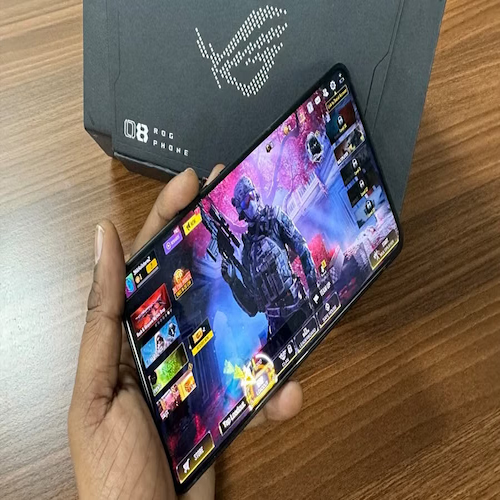
PUBG Mobile demands a phone that delivers consistent frame rates and instant touch response, and Samsung’s latest lineup offers compelling options for every type of player. The Galaxy S26 Ultra, powered by the Snapdragon 8 Elite Gen 5 chipset, pushes PUBG Mobile to a smooth 90 FPS today, with a 120 FPS update expected soon. Its advanced cooling system keeps temperatures below 30°C during intense firefights, ensuring you never lose a duel to thermal throttling. The Galaxy S26+ surprises with its new Exynos 2600 chip featuring AMD RDNA 4 graphics; it delivers nearly 119 FPS on low settings and maintains over 89 FPS even at HD graphics, outperforming the previous generation’s Ultra model in some scenarios.

For gamers who prioritize immersion, the Galaxy Z Fold 7 transforms your battleground with its expansive folding display. The custom Snapdragon 8 Elite for Galaxy chip maintains a steady 90 FPS in PUBG on the large screen, while the built-in Gemini AI assistant answers questions about game items and strategies on the fly. Budget-conscious players should look at the Galaxy A55, which runs the game at a capped 60 FPS, plenty competitive for most players, though heavier titles push its temperature higher than rivals. Remember, regardless of which phone you choose, set your graphics to “Smooth” and enable “Ultra Extreme” frame rate to unlock the highest possible FPS your device supports.

PUBG Tips

Master your landing and loot prioritization immediately after you drop from the plane. Aim for smaller compounds rather than major cities; you avoid the initial bloodbath and still find decent gear. Pick a landing spot and dive straight down at 234 km/h to hit the ground before everyone else. Once you land, grab a weapon first. Even a pistol beats bare fists. Prioritize a helmet and body armor (Level 2 or higher) before you engage any enemy. Always keep one or two smoke grenades; they obscure enemy vision, revive downed teammates safely, or cover your escape across open fields.

Control your engagements and never shoot from the same position twice. After you fire, enemies pinpoint your location instantly, so relocate immediately. Move to a different window, a new tree, or another rock. Use the “peek and fire” buttons rather than exposing your whole body; this reduces your hitbox significantly. Learn to hip-fire in close-quarters (inside buildings or within 5 meters); aiming down sights wastes precious milliseconds. Finally, pay attention to the circle. Stop chasing kills and start planning your rotation at least 60 seconds before the Blue Zone moves. Vehicles give you speed but announce your arrival. Dismount 150 meters early and approach on foot. Winning in PUBG rewards smart decisions, not just quick reflexes.

Enjoy Your PUBG Gaming Experience

In the end, no amount of skill, strategy, or practice can outsmart a phone that simply cannot keep up. You can master every recoil pattern, memorize every loot spawn, and predict the Blue Zone perfectly. However, if your device stutters the moment you pull the trigger, none of it matters. The right phone does not just improve your game; it liberates your potential. It transforms frustration into flow, lag into reaction, and defeats into chicken dinners. So before you drop into that next match, ask yourself one honest question: Is your phone fighting with you or against you? Because in PUBG Mobile, the battlefield rewards the prepared and punishes everyone else. Now go get that dinner.

error: Uh-oh! You just triggered an invisible copyright trap. Want the good stuff? Share this post or link back. No one likes a loot thief in PUBG or on the internet.